To make a wedding seating plan, start from the list of guests who have confirmed, group them by affinity, choose the shape and number of tables according to the room, place the constraints first (head table, children, dietary requirements), then review and freeze the plan. Allow 8 to 10 guests per round table and keep one empty chair per table.
In brief
- Only seat guests who have replied: a plan based on « maybes » gets redone three times.
- Think in groups (family, friends, colleagues), not isolated individuals.
- Place the constraints first: head table, children, people with reduced mobility, allergies.
- One person holds the reference version, with a deadline for changes.
- A guest list template to copy is further down in this article.
Step 1: start from a reliable guest list
A seating plan is not a drawing: it is a list of people with information. Before seating anyone, gather for each guest their name, their group (family on one side or the other, friends, colleagues), their status (adult, child) and their reply (attending, pending, declined). Add the dietary requirement or allergy right now: the caterer will need it, and it is simpler to note it once and for all than to dig it out of messages.
The template below can be pasted into a spreadsheet and serves as a starting point, whether you work with a tool or on paper.
Last name ; First name ; Group ; Adult/Child ; Reply (yes/pending/no) ; Diet or allergy ; Must be near ; Must not be near ; Table
Martin ; Claire ; Bride's family ; Adult ; yes ; gluten-free ; Martin Paul ; ;
Durand ; Léo ; Groom's friends ; Adult ; pending ; ; Durand Inès ; ;
Lefèvre ; Nathan ; Groom's family ; Child ; yes ; ; Lefèvre Brigitte (parent) ; ;
Prefer not to install anything? Our free online seating plan works without an account: paste this list, let automatic placement group families and couples together, adjust by drag and drop, then print or export as a PDF. Your data stays on your device.
The two columns « must be near » and « must not be near » are the ones that prevent redone plans: they contain the real constraints, often known only to the couple.
Step 2: form groups, not pairs
Build blocks of 6 to 10 people who already know each other: siblings and their partners, childhood friends, a work team. A group that fits at one table is placed in a single move; an isolated person, on the other hand, takes some thought. For guests with no natural group (a colleague, a neighbour), plan a « mixed » table where everyone has at least one thing in common with a neighbour. Mixing families is not an obligation: it is a choice to make with the couple, depending on the atmosphere they want.
Step 3: choose the shape and number of tables
The shape depends on the room as much as on taste. The details are in our article round or rectangular table. Here are the starting values offered by Eventelio’s floor plan editor, which you can change table by table:
| Table type | Default dimensions | Default seats |
|---|---|---|
| Round table | 1.80 m diameter | 8 (10 for the 2 m variant) |
| Rectangular table | 2.40 m × 0.90 m | 8 |
| Head table | 4.80 m × 0.90 m | 10 |
Source: default settings of Eventelio’s floor plan editor (version 0.1.0, October 2026). These are starting guidelines, not standards: confirm the actual dimensions with your furniture hire company and with the venue.
To work out how many tables to plan, divide the number of confirmed guests by the target number of seats, then add the head table and, if needed, a children’s table. Keep one empty chair at each table: a cancellation or a surprise guest then does not force you to start over.
Step 4: place the constraints first
In this order:
- The head table: the couple, witnesses, parents or not, depending on the family situation.
- Children: near their parents for the little ones, at a dedicated table for older ones if the parents agree.
- Access: people with reduced mobility near a clear passage, elderly people away from the speakers, parents of young children near the exit.
- Dietary requirements and allergies: grouping special menus on a few tables simplifies service, but never isolate a person for that reason.
Only then place the groups around these fixed points.
Step 5: place the groups, then adjust
Put each group on a table, then move the people on their own to fill in. Review table by table with three questions: does everyone have at least one person to talk to? Is there anyone better kept away from their neighbour? Is the table balanced between ages and temperaments? A successful plan is one nobody talks about on the evening of the wedding.
Step 6: review, freeze and share
Have the plan reviewed by someone who knows the families. Send the final version to the caterer (who must know where to serve the special menus), to the venue and to the DJ if guests are to be named over the microphone. Set a deadline for changes and stick to it: after it, any change goes through a single person. On this topic, read how to lock the programme.
Free seating or named plan?
Free seating (guests choose their table) suits small weddings or buffet-style meals: it saves the work of a plan, but does not settle children, special menus or the head table, which must then be reserved. A named plan (one name per seat) is preferable whenever the meal is plated, families are large or dietary requirements need to be tracked. A middle ground is to assign a table to each group and let guests choose their seat within it.
Delicate situations, and how to handle them
- Separated parents or blended families: ask the couple what they want before imagining a solution. Two neighbouring tables, with a child on each side, avoid a face-to-face without sidelining anyone.
- Guests on their own: seat them at a table where they know at least one person, never « at the far end of the room ».
- Teenagers: a table near the dance floor, with an older cousin as a point of reference, often works better than separating them from the adults.
- Suppliers present at the meal (photographer, DJ): plan their place settings, possibly at a separate table so they can leave without disturbing anyone.
Common mistakes
- Seating before the replies are in. Every late reply creates a domino effect across several tables.
- Forgetting the children or moving them away from their parents without warning.
- Filling every seat. Leave a margin of one empty chair per table.
- Not sharing the plan with the caterer: special menus must reach the right seat.
- Working on ten versions. One file per supplier always ends up diverging: you need a single reference version.
Making your seating plan with Eventelio
Eventelio is a tool for event professionals: it is you (planner, DJ, caterer, venue) who prepare the plan with your clients. In practice:
- you import the guest list or paste it in, with replies, adults and children, dietary requirements and allergies;
- the « Place automatically » button seats the unplaced guests while keeping groups together; you then adjust by drag and drop;
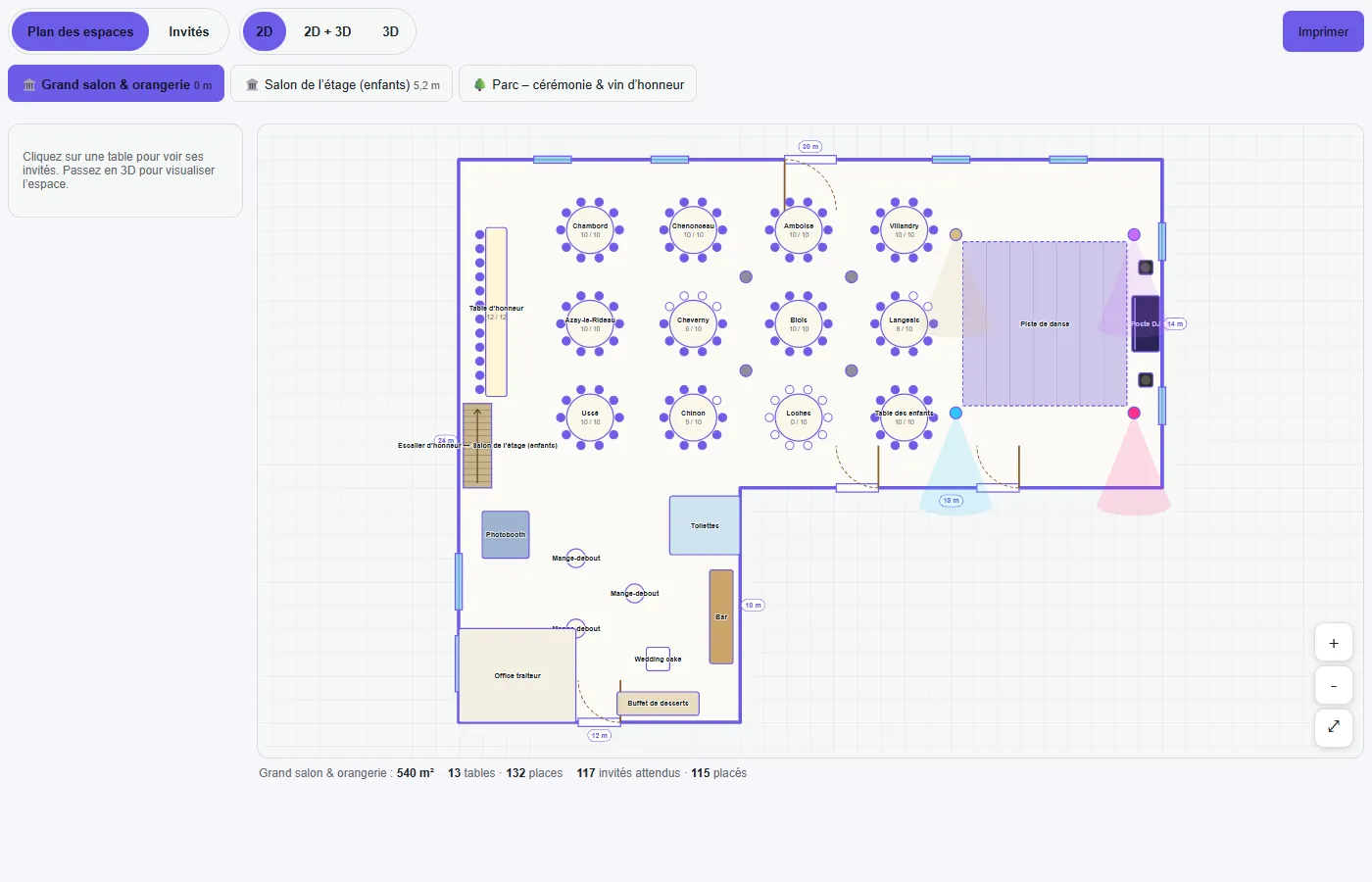
- the plan can be viewed in 2D, in 3D or side by side; 3D lets you walk around at guest eye level, with an evening mode;
- the caterer and the venue view the plan and the guest list with their dietary requirements, within the rights you give them;
- the « HD image » button saves the 3D view and adds it to the PDF file;
- the wedding programme can be locked on the date of your choice, with a history of changes.
The client’s AI assistant (ChatGPT, Claude or Le Chat) can also read a guest list from a photo and enter it, with a log of every change and the ability to undo it: see keys, log and undo. This feature is included from the Premium plan.
What the tool does not do: it does not decide for you who should sit next to whom (automatic placement groups people, it does not judge relationships), and it does not replace the couple’s approval. Allergies entered remain declarative: they must be confirmed through the caterer’s procedures.
The seating plan, guests and run of show are available from the Free plan (2 active events). The Premium (€29 excl. VAT per month) and Pro (€79 excl. VAT per month) plans add unlimited events, your branding and the AI assistant: see the pricing page. To try it, create your account; you can also read the pages for wedding planners and caterers, or discover all the features.
Frequently asked questions
How many people per wedding table?
Eight to ten people for a round table, which is still small enough for all guests to chat. For a rectangular table, it all depends on its length: Eventelio’s default setting is 8 seats for 2.40 m. Confirm with your hire company.
Should couples be separated?
No, unless explicitly requested. Couples stay together; it is rather groups of friends or colleagues that can be mixed to liven up a table.
When should I make my seating plan?
As soon as most replies are in, generally a few weeks before the wedding. A provisional plan, earlier on, gives the caterer and the venue a first idea; it is better to present it as provisional.
What should I do when a guest cancels at the last minute?
Remove them from the plan, check that no table becomes too sparse, and tell the caterer the new number of covers. A deadline for changes, announced from the start, limits these adjustments.
Is a seating plan compulsory?
No. It is neither a legal requirement nor a rule of etiquette: small weddings and buffets often go without. It becomes valuable when the meal is served at the table, when there are many guests or when dietary requirements need to be tracked.
Sources and method
- Dimensions and number of seats: settings of Eventelio’s floor plan editor (version 0.1.0), to be confirmed with your furniture hire company.
- The seating advice (one-chair margin, order of constraints, groups of 6 to 10) are field practices from Eventelio’s editorial team: they are recommendations, not statistics.
- The figures in the screenshot (13 tables, 132 seats, 117 guests, 115 seated) come from Eventelio’s fictional demo wedding.